Centralized AWS Backup for RDS
When I started setting up backups for RDS at Prison Fellowship, I went down the path of building something way more complicated than it needed to be. Custom Lambda functions, cross-account snapshot copies, retention logic — the whole nine yards. Turns out AWS already solved this problem.
The Simple Setup
AWS Backup with Organizations support does the heavy lifting. The architecture is straightforward:
- Management account — defines the backup policy via AWS Organizations
- Workload accounts — where your RDS instances live
- Backup account — a dedicated account that stores backup copies
The management account pushes a backup policy down to all member accounts. Those accounts run their local backups on schedule, and then a copy rule sends them to a backup vault in the centralized backup account. That's it.
How It Works
- Enable AWS Backup in your AWS Organization from the management account
- Turn on cross-account backup in the AWS Backup settings
- Create a backup vault in your dedicated backup account
- Define a backup policy in the management account with:
- A backup rule (schedule, retention, lifecycle)
- A copy rule pointing to the vault in your backup account
- Attach the policy to the OUs or accounts you want covered
The backup policy automatically applies to tagged resources in the target accounts. Tag your RDS instances with something like backup: daily and the policy picks them up.
Multi-Region for Disaster Recovery
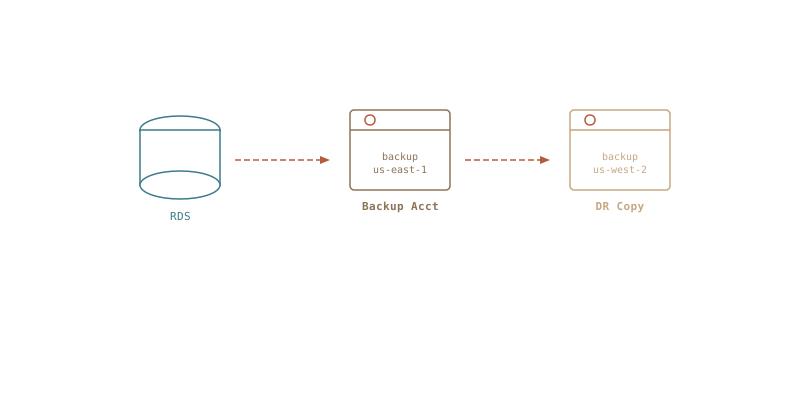
The copy rule can also target a vault in a different region. So your backup flow looks like:
RDS (us-east-1, workload account)
  → local backup vault (us-east-1, workload account)
  → copy to backup vault (us-east-1, backup account)
  → copy to backup vault (us-west-2, backup account)
Now you've got backups in a separate account AND a separate region. If us-east-1 has a bad day, your data is sitting safely in us-west-2 in an account that your workload accounts can't touch.
The Pitfall I Fell Into
I originally tried to wire this up manually — Lambda functions triggered by EventBridge to copy snapshots cross-account, another Lambda to manage retention, IAM roles and KMS key policies everywhere. It worked, but it was fragile and annoying to maintain.
The Organizations-based approach replaced all of that with a single backup policy. No custom code, no Lambda functions, no EventBridge rules. Just a policy document and some tags.
Terraform All the Things
This whole setup is managed in Terraform because infrastructure should always be in code. Here's the gist of what the resources look like:
resource "aws_organizations_policy" "backup" {
  name    = "rds-backup-policy"
  type    = "BACKUP_POLICY"
  content = jsonencode({
    plans = {
      rds_backup = {
        regions = { "@@assign" = ["us-east-1"] }
        rules = {
          daily = {
            schedule_expression         = { "@@assign" = "cron(0 5 ? * * *)" }
            start_backup_window_minutes = { "@@assign" = 60 }
            target_backup_vault_name    = { "@@assign" = "Default" }
            lifecycle = {
              delete_after_days = { "@@assign" = 35 }
            }
            copy_actions = {
              "arn:aws:backup:us-east-1:BACKUP_ACCOUNT_ID:backup-vault:central-vault" = {
                target_backup_vault_arn = {
                  "@@assign" = "arn:aws:backup:us-east-1:BACKUP_ACCOUNT_ID:backup-vault:central-vault"
                }
                lifecycle = {
                  delete_after_days = { "@@assign" = 90 }
                }
              }
              "arn:aws:backup:us-west-2:BACKUP_ACCOUNT_ID:backup-vault:central-vault-dr" = {
                target_backup_vault_arn = {
                  "@@assign" = "arn:aws:backup:us-west-2:BACKUP_ACCOUNT_ID:backup-vault:central-vault-dr"
                }
                lifecycle = {
                  delete_after_days = { "@@assign" = 90 }
                }
              }
            }
          }
        }
        selections = {
          tags = {
            rds_tagged = {
              iam_role_arn = { "@@assign" = "arn:aws:iam::$account:role/BackupRole" }
              tag_key      = { "@@assign" = "backup" }
              tag_value    = { "@@assign" = ["daily"] }
            }
          }
        }
      }
    }
  })
}

resource "aws_organizations_policy_attachment" "backup" {
  policy_id = aws_organizations_policy.backup.id
  target_id = var.workload_ou_id
}
The backup vaults and IAM roles in the backup account are in their own Terraform workspace. The policy itself lives in the management account's config. Clean separation, easy to audit, and no one is clicking around in the console.
Key Takeaways
- Don't build what AWS already provides. Check if a managed service covers your use case before writing custom automation.
- Use a dedicated backup account. It creates a security boundary — even if a workload account is compromised, the attacker can't delete your backups.
- Multi-region copies are a checkbox, not a project. Add a second copy rule in the policy and you're done.
- Tag your resources. The backup policy uses tag-based selection, so consistent tagging is what makes the whole thing work.
Sometimes the best engineering decision is realizing you're overengineering it.